

What’s new in ONE Pocket and NEO Pocket

The ONE Pocket and NEO Pocket mobile apps continue to evolve: smoother navigation, faster access to favorite tools, instant playback of videos and audio… An overview of a series of improvements designed to make the mobile experience even more practical and personalized.
Find your apps in a snap
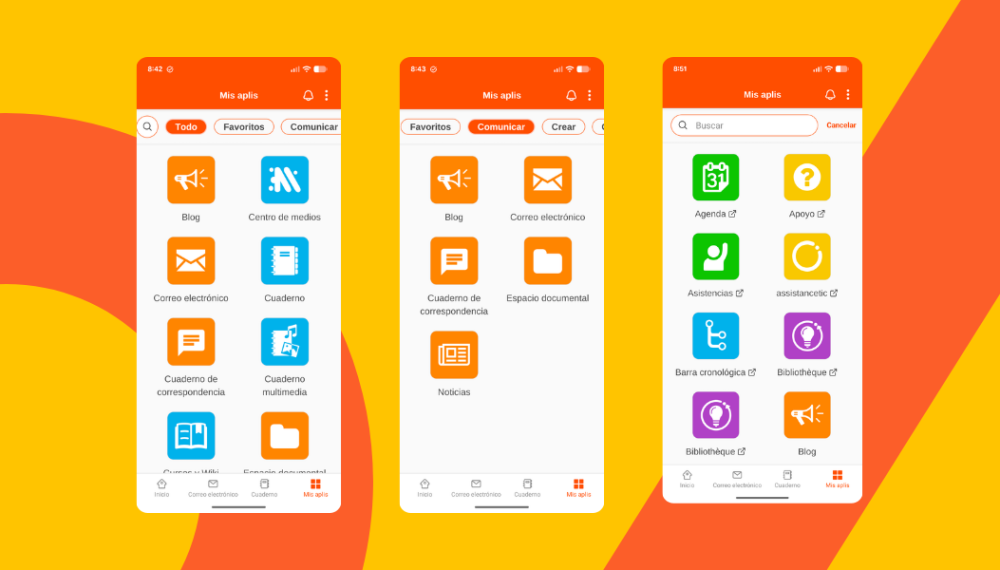
Already redesigned on the web version of the platforms, the “My Apps” page is now available on mobile apps, featuring an interface designed to help users quickly find the tools they need.
New features include:
- redesigned icons, shown in white within a colored frame;
- apps organized into categories: All, Favorites, Communicate, Create, Organize, and Other services;
- an integrated search bar to quickly find an application.
This new organization makes navigation easier and provides a clearer overview of all available workspace services.
Favorites for even faster access
Users can add apps to their favorites by long-pressing an app icon, then checking “Add to favorites” in the menu that appears. This same menu also provides access to an information and help page about the app.
All digital workspace tools now accessible
To improve the visibility of available services, users can now choose to display all digital workspace applications, including those only accessible via a web browser. In this case, the mobile app automatically redirects the user to their default browser to access the relevant service.
By default, only apps available within the mobile application are shown.
Instant playback of videos and audio files
Good news for mobile users: the built-in viewer has also been improved.
Already able to open images and PDFs, it now supports:
- .mp4 video files;
.mp3 and .FLAC audio files on Android.
As a result, there is no need to download files to view or listen to them. A simple click on “Play” is enough to watch a video or listen to a recording directly within the app.
Simplified access for parents with multiple accounts
Another new feature: parents can now link two different accounts within the mobile app, whether for their children or their partner.
Concretely, from “My account,” they can switch from one account to another without having to log out and log back in, in order to access:
- a partner’s account;
or separate parent accounts for tracking each child.
This feature provides more individualized content than merging accounts, where notifications for both children are combined into a single interface. Previously reserved for teachers and staff, this option is now available to families.
comments
Add comment