

Web 6.8.0
🪴[EVOLUTIONS]
The new “My Apps” page for even more intuitive navigation
The “My Apps” page has been improved to offer simplified access to a multitude of tools, while highlighting new features and key uses. A redesign designed to better guide, inspire, and save time.
New technology
Following the Blog, Messaging, Courses, and Wiki apps, it’s now the turn of the My Apps page to switch to React for an even more optimized design, responsiveness, and user experience.
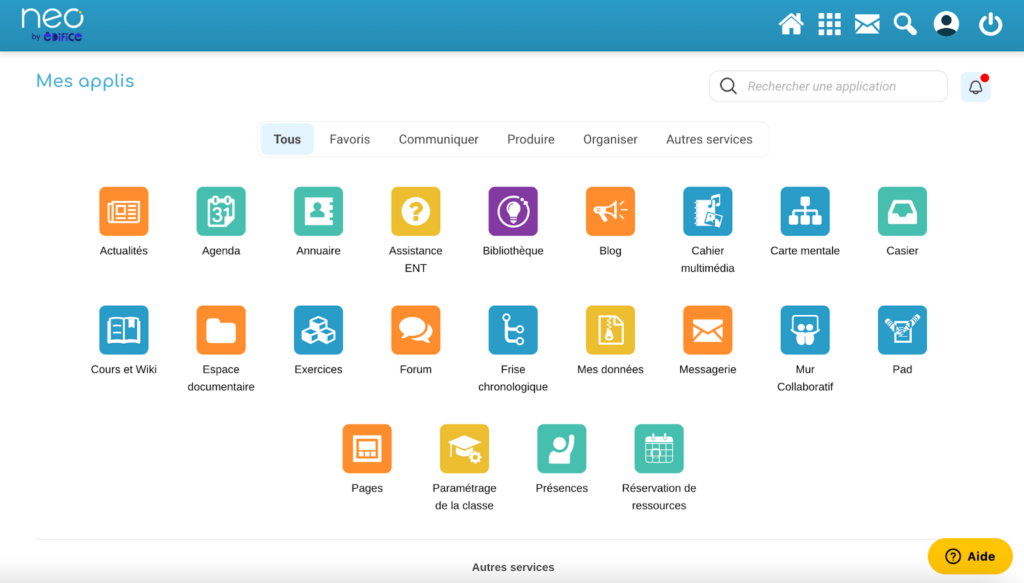
Find the app you want in the blink of an eye
The My Apps page is the gateway to all the tools in Édifice’s digital workspaces. The new interface simplifies navigation:
✅ A category filter now allows you to sort apps by use: communication, production, organization, favorites, and other services.
✅ Applications are recognizable by their color: orange for communication, blue for production, green for organization, and yellow for administration.
✅ Apps appear in alphabetical order. However, it is no longer possible to move them using drag-and-drop.
✅ The “Favorites” tab offers a personalized view and replaces the top bar that used to display favorite apps (for secondary devices).
Please also note that when you open the My Apps page, the last tab you viewed will be displayed. This allows you to directly access your favorites if you viewed them during your last visit to the page.
An action menu to support usage
The new “My Apps” page supports users as they develop their skills. An action menu opens when you click on the three dots at the top right of each application. It allows you to:
✅ open the application;
✅ add it to your favorites. They will then automatically appear in the “Favorites” tab and be marked with a star;
✅ consult online help to learn everything about the app and find answers to questions;
✅ find inspiration in the Library by discovering activities created by their peers with this app (exclusively for teacher accounts).
New features gain visibility
A notification bell alerts users to the latest new features in the digital workspace. Clicking on it brings up a modal window with information about the new app features.